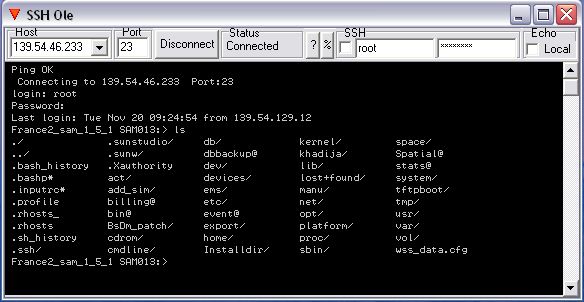
avec cet outil tout ce que vous avez à faire par Telnet/SSH sur server ou router peut être automatisé.
un exemple des commandes dispo :
*********************************************************************
*commandes available to manage SSHo interface
*********************************************************************
set cli = createobject("SSHOLE.server")
* cli.CmdOut(A$) to send a command line to run
=> automatic reset of TextIn
=> automatic reset of waitStatus
*A$ = cli.TextIn to read text received after last command sent
*A = cli.LineNbIn to read Nbr of lines received after last command sent
*A$ = cli.LineIn(Nb) to read a specific line
* cli.FilterSet(A$) "ON"/"OFF" to activate/desactivate Filter at TextIn reading
* cli.FilterFor(Nb),(A$),(B$) 0<9 KeyWords A$ to search in text received after a command sent
and to replace by B$
* cli.WaitFor(Nb),(A$),(B$) 0<5 KeyWords A$ to search in text to receive
=> if B$ = "" then modification of WaitStatus
=> if B$ <> "" then B$ is sent on command line
*A = cli.WaitStatus to read result of WaitFor search (if nothing to send back)
if in WaitFor() A$ <> "" and B$ = "" => WaitStatus positionned
result = $1+$2+$4+$8+$10 for WaitFor(0,1,2,3,4))
* cli.IniReset to Reset WaitFor(), Filterfor() and Show()
* cli.Show(A) 0/1/2 to manage CmdOle windows Invisible/protected+Visible/Visible
3 no reset of TextIn
4 = 2 + Local Echo
* cli.UserOut(A$),(B$) to send automatic user A$= request of User / B$ = User to send
* cli.PasswOut(A$),(B$) to send automatic Password A$= request of password / B$ = Password to send
* cli.SSHset(a$) "ON"/"OFF" to use SSH or Telnet
* cli.Connect("ON") to connect to server
*A$ = cli.StatusIn to read connexion status ("Connected" if connected)
* cli.WaitReset to reset WaitStatus
* cli.IpOut(A$) to give IP adress
* cli.PortOut(A$) to give Port Number
* cli.TextRaz to reset Text
* cli.Log (A$) not used
*******************************************************************************
* Next commands are availables only when script is launched from SSHo
*******************************************************************************
*A$ = cli.ScriptName to have name of scrip running
*A$ = cli.ScriptFullName to have full name of scrip running
* cli.Pause to pause script running
* cli.Abort to abort script running
* cli.sleep(A) to stop script during A sec
*A$ = cli.Path to read path of SSHo
* cli.DoEvents to give time to other applications
* cli.Echo(A$) to print a line in communication windows
*
********************************************************************************
* 2 way to manage by ole SSHo
********************************************************************************
* 1) from internal script and no need to launch object by set "cli = createobject("SSHOLE.server")"
* OLE object is "SSHo" => this name of object is fix and unic
* no need to register "SSSHo" object if you use internal scripting
* 2) from external script, you have to launch SSHo object by set "cli = createobject("SSHOLE.server")"
* OLE object can have all names except "SSHO"
* You must register "SSHo" object if you want to use external launch of SSHo
********************************************************************************
* to register SSHo like OLE object
********************************************************************************
* you can launch register.bat script to register SSHo OLE object
* you can launch unregister.bat to unregister SSHo OLE object
* or ou have just to launch SSHo and registration will be done automatically
********************************************************************************
********* you must be administrator in your PC or SSHo will not start **********
********************************************************************************