Enregistrer une photo à partir d'une Webcam
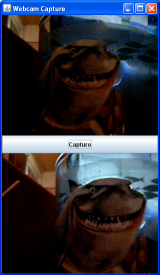
L'application capture le flux d'une cam et l'affiche en continue sur un JFrame. Le bouton Capture permet de prendre une copie de l'image en cours et l'enregistre au format JPEG sous C:test.jpg.A droite, une copie d'écran de ma tasse requin prise à partir d'un webcam Microsoft :)
Pour faire fonctionner JMF, ne pas oublier de lier les JAR JMF au projet. Sous NetBeans, suivre les étapes suivantes:
- click droit sur le nom du projet,
- propriétés
- ajouter les jar à partir de la fenêtre Librairie
/**
 *
 * @author found on the web
 */
import java.awt.BorderLayout;
import java.awt.Component;
import java.awt.Dimension;
import java.awt.Frame;
import java.awt.Graphics;
import java.awt.Graphics2D;
import java.awt.Image;
import java.awt.Panel;
import java.awt.event.ActionEvent;
import java.awt.event.ActionListener;
import java.awt.event.WindowAdapter;
import java.awt.event.WindowEvent;
import java.awt.image.BufferedImage;
import java.io.FileOutputStream;

import javax.media.Buffer;
import javax.media.CaptureDeviceInfo;
import javax.media.CaptureDeviceManager;
import javax.media.Manager;
import javax.media.MediaLocator;
import javax.media.Player;
import javax.media.control.FrameGrabbingControl;
import javax.media.format.VideoFormat;
import javax.media.util.BufferToImage;
import javax.swing.JButton;
import javax.swing.JComponent;

import com.sun.image.codec.jpeg.JPEGCodec;
import com.sun.image.codec.jpeg.JPEGEncodeParam;
import com.sun.image.codec.jpeg.JPEGImageEncoder;

public class WebcamCapture extends Panel implements ActionListener {

    public static Player player = null;
    public CaptureDeviceInfo di = null;
    public MediaLocator ml = null;
    public JButton capture = null;
    public Buffer buf = null;
    public Image img = null;
    public VideoFormat vf = null;
    public BufferToImage btoi = null;
    public ImagePanel imgpanel = null;

    public WebcamCapture() {
        setLayout(new BorderLayout());
        setSize(320, 550);

        imgpanel = new ImagePanel();
        capture = new JButton("Capture");
        capture.addActionListener(this);

        String str1 = "vfw:Logitech USB Video Camera:0";
        String str2 = "vfw:Microsoft WDM Image Capture (Win32):0";
        di = CaptureDeviceManager.getDevice(str2);
        ml = new MediaLocator("vfw://0");

        try {
            player = Manager.createRealizedPlayer(ml);
            player.start();
            Component comp;

            if ((comp = player.getVisualComponent()) != null) {
                add(comp, BorderLayout.NORTH);
            }
            add(capture, BorderLayout.CENTER);
            add(imgpanel, BorderLayout.SOUTH);
        } catch (Exception e) {
            e.printStackTrace();
        }
    }

    public static void main(String[] args) {
        Frame f = new Frame("Webcam Capture");
        WebcamCapture cf = new WebcamCapture();

        f.addWindowListener(new WindowAdapter() {
            public void windowClosing(WindowEvent e) {
                playerclose();
                System.exit(0);
            }});

        f.add("Center", cf);
        f.pack();
        f.setSize(new Dimension(320, 550));
        f.setVisible(true);
    }

    public static void playerclose() {
        player.close();
        player.deallocate();
    }

    public void actionPerformed(ActionEvent e) {
        JComponent c = (JComponent) e.getSource();

        if (c == capture) {
            // Grab a frame
            FrameGrabbingControl fgc =

		(FrameGrabbingControl) player.getControl("javax.media.control.FrameGrabbingControl");
            buf = fgc.grabFrame();
            // Convert it to an image
            btoi = new BufferToImage((VideoFormat) buf.getFormat());
            img = btoi.createImage(buf);
            // show the image
            imgpanel.setImage(img);
            // save image
            saveJPG(img, "c:test.jpg");
        }
    }

    class ImagePanel extends Panel {

        public Image myimg = null;

        public ImagePanel() {
            setLayout(null);
            setSize(320, 240);
        }

        public void setImage(Image img) {
            this.myimg = img;
            repaint();
        }

        public void paint(Graphics g) {
            if (myimg != null) {
                g.drawImage(myimg, 0, 0, this);
            }
        }
    }

    public static void saveJPG(Image img, String s) {
        BufferedImage bi = new BufferedImage(img.getWidth(null), img.getHeight(null),

	 BufferedImage.TYPE_INT_RGB);
        Graphics2D g2 = bi.createGraphics();
        g2.drawImage(img, null, null);

        FileOutputStream out = null;
        try {
            out = new FileOutputStream(s);
        } catch (java.io.FileNotFoundException io) {
            System.out.println("File Not Found");
        }

        JPEGImageEncoder encoder = JPEGCodec.createJPEGEncoder(out);
        JPEGEncodeParam param = encoder.getDefaultJPEGEncodeParam(bi);
        param.setQuality(1.0f, false);
        encoder.setJPEGEncodeParam(param);

        try {
            encoder.encode(bi);
            out.close();
        } catch (java.io.IOException io) {
            System.out.println("IOException");
        }
    }
}

